Legasy Beauty & Spa Theme: A Developer's Hands-On Review and Gu
-
Legasy Beauty & Spa Theme: A Developer's Hands-On Review and Guide
The WordPress theme market for service-based businesses, particularly in the wellness and beauty sector, is saturated with options that promise a one-click solution to a beautiful, functional website. Most fall short, collapsing under the weight of bloated code, convoluted options panels, or a demo that looks nothing like the final product. Today, we're putting the Legasy - Beauty & Spa WordPress Theme on the operating table. This theme positions itself as a premium, elegant solution for spas, salons, and wellness centers. We're going to move beyond the marketing copy and see if it holds up to a real-world technical evaluation, from installation to performance analysis.
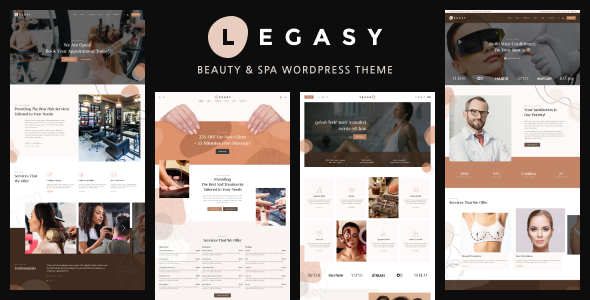
Deconstructing the Demo: A Developer's First Look
Before any install, the first step is always to scrutinize the public-facing demo. It's the theme's resume, and it tells you a lot about the developer's priorities. Legasy's demos are, on the surface, visually appealing. They lean into a modern, clean aesthetic with soft color palettes, ample white space, and professional-grade stock photography. This is exactly what the target market wants.
The typography choices are generally solid, using sans-serif fonts that are legible and stylish. The layout is heavily reliant on the Elementor page builder, which is evident in the full-width sections, subtle animations on scroll, and modular content blocks. From a design perspective, it checks the right boxes. It looks expensive and trustworthy, which is crucial for a business asking clients to book appointments and spend money.
However, a developer's eye sees more than just the design. The user experience (UX) flow is standard but effective. The main navigation is clear, with top-level items like "Services," "About," "Contact," and a prominent "Book Now" call-to-action (CTA). This is good. The hero sections on the homepages are well-executed, immediately establishing the brand's purpose and guiding the user toward the primary conversion goal: booking an appointment. The service pages are laid out cleanly, often in a grid or list format with pricing and a brief description. It’s a proven formula that works.
Performance Triage: The Elephant in the Room
This is where most "beautiful" themes fail. A pretty site that takes five seconds to load is a useless site. Running one of Legasy's main demos through GTmetrix reveals a typical, and slightly concerning, profile for an off-the-shelf, Elementor-based theme.
- Page Size: The total page size often hovers between 2.5MB and 4MB. This is largely due to unoptimized, high-resolution images. For a spa business that relies on stunning visuals, this is a double-edged sword. You need the quality, but you also need the speed. A good image optimization plugin (like ShortPixel or Imagify) and the use of modern formats like WebP would be non-negotiable.
- HTTP Requests: The number of requests is often high, typically in the 80-100 range. This is a direct result of loading numerous CSS files, JavaScript libraries, and font assets from the theme itself, WordPress core, and the suite of required plugins. A caching and asset optimization plugin (like WP Rocket or Perfmatters) would be essential to minify and combine these files.
- Core Web Vitals: The Largest Contentful Paint (LCP) is often delayed by the large hero image. Cumulative Layout Shift (CLS) can also be an issue if fonts are not preloaded correctly or if animations load late, causing content to jump around. These are fixable issues, but they are not fixed out of thethe-box. The end-user, or their developer, will have to do the heavy lifting on optimization.
The takeaway is that Legasy is not a performance-first theme. It's a design-first theme that requires significant post-installation optimization to be viable in a competitive market. This isn't a deal-breaker, but it's a critical piece of information that the marketing materials conveniently omit.
Installation & Setup: The Real Test Begins
Let's get our hands dirty. The installation process is the first real interaction you have with the theme's architecture. It can be a seamless experience or a frustrating nightmare. Here’s a breakdown of the process and potential pitfalls.
Prerequisites and Initial Steps
Before you even think about uploading the theme, ensure your hosting environment is adequate. Don't try this on a cheap, under-resourced shared hosting plan. You'll need:
- PHP Version: 7.4 or higher (8.0+ is recommended).
- Memory Limit: A `memory_limit` of at least 256M, preferably 512M. The demo import process, in particular, is memory-intensive.
- Execution Time: A `max_execution_time` of at least 300 seconds. This prevents the server from timing out during plugin installation or content import.
You can usually check or request these changes from your hosting provider. Failure to meet these requirements is the number one cause of failed demo imports.
Step-by-Step Installation Guide
- Download and Unzip: After acquiring the theme files, you'll typically have a main `.zip` file. Unzip this first. Inside, you will find documentation, licensing information, and two crucial files: `legasy.zip` (the parent theme) and potentially `legasy-child.zip` (the child theme). Always install the child theme. This allows you to make code customizations without them being overwritten during future theme updates.
- Upload the Theme: In your WordPress dashboard, navigate to Appearance > Themes > Add New > Upload Theme. First, upload and install `legasy.zip`. Do not activate it. Go back and do the same for `legasy-child.zip`. Once the child theme is installed, activate it.
- The Plugin Onslaught: Upon activation, you'll be greeted by a large notice at the top of your dashboard prompting you to install required and recommended plugins. This is standard practice. Legasy relies on a handful of key plugins:
- Elementor (Free): The core page builder.
- Legasy Core: A custom plugin that houses the theme's core functionality, like custom post types and Elementor widgets. This is a good practice, as it separates functionality from presentation.
- Contact Form 7: A basic but functional contact form plugin.
- A Booking Plugin: The demo often showcases a specific booking plugin. This might be a bundled premium plugin or a recommendation for a free one. Pay close attention to this, as it's the most critical piece of business logic for your site.
- Demo Content Import: This is the moment of truth. After the plugins are installed and activated, you should find a "Demo Import" or similar option under the Appearance menu or a dedicated theme options panel. Legasy's importer typically presents you with the various demo layouts you saw on the sales page. Choose one and begin the import. Grab a coffee; this can take several minutes.
Post-Import Reality Check
Did the one-click import work perfectly? Rarely. Here’s what to expect and how to troubleshoot:
- "Finished!" but it's broken: If the importer completes but the site looks nothing like the demo, the most likely cause is a server timeout that happened silently. Rerunning the import process sometimes helps. A better option is to use a plugin like "WP Reset" to wipe the database and try again on a clean slate.
- Missing Images: Often, demo content will import with placeholder images due to copyright restrictions on the stock photos. This is normal. Your job is to replace them with your client's actual photography.
- Menu and Widget Issues: Sometimes, the menu locations and widget assignments don't map correctly. You may need to manually go to Appearance > Menus and assign the imported menu to the "Primary Menu" location. Similarly, check Appearance > Widgets to ensure sidebars and footer areas are populated correctly.
Legasy's importer is generally reliable, provided your server environment is properly configured. But you should budget time for this post-import cleanup. It's an inevitable part of the process.
Under the Hood: A Technical Deep Dive
With the site looking like the demo, it's time to dig into the theme's architecture and see how it's built for customization.
Elementor Integration and Custom Widgets
Legasy's value proposition is tied directly to its integration with Elementor. The theme provides a set of custom Elementor widgets specifically for the beauty and spa niche. These might include things like:
- Service Grids/Carousels: To display treatments with pricing and images.
- Team Member Profiles: For showcasing staff and therapists.
- Testimonial Sliders: For social proof.
- Pricing Tables: For membership or package deals.
These widgets are a huge time-saver. They are pre-styled to match the theme's aesthetic, saving you from having to build these complex layouts from scratch with basic Elementor elements. The implementation is generally good, with intuitive controls in the Elementor panel for changing content, colors, and layouts. The quality of the code behind these widgets determines their performance and flexibility. A well-coded widget will be lightweight and offer just the right amount of options without being overwhelming.
Theme Options Panel
Beyond Elementor, global site settings are controlled via the WordPress Customizer (Appearance > Customize). This is the modern, preferred way of handling theme options, as it provides a live preview of your changes. Legasy's Customizer options are comprehensive. You can typically control:
- Branding: Uploading your logo, favicon, and alternative logos for different headers.
- Typography: Setting global fonts and sizes for body text, headings (H1, H2, etc.), and menus. Good themes will integrate with Google Fonts.
- Color Scheme: Defining a global color palette for primary, secondary, and accent colors. This is a massive win for quickly rebranding the site.
- Header & Footer: Selecting from pre-built header layouts (e.g., logo left, menu right; centered logo) and configuring footer widget areas and copyright text. More advanced themes might include a full Header/Footer builder using Elementor.
The panel is logically organized and easy to navigate. This is a strong point for Legasy, as it empowers users with less technical skill to make significant global changes without touching code or editing every single page in Elementor.
The Booking System
This is arguably the most important functional component. Legasy doesn't build a booking system from scratch. Instead, it integrates and styles a third-party plugin. This is the correct approach. Building a secure and reliable booking engine is a massive undertaking. By relying on a dedicated solution (like Bookly, Amelia, or LatePoint), the theme leverages a robust, feature-rich system while focusing on what it does best: presentation.
Your job as the developer is to configure this booking plugin. This involves setting up services, defining staff members and their schedules, configuring pricing, setting up payment gateway integrations (like Stripe or PayPal), and customizing email notifications. The theme's job is to make sure the front-end forms and calendars look beautiful and seamless. Legasy does this well, ensuring the booking process feels like an integrated part of the site, not a tacked-on plugin.
The GPL Angle and Value Proposition
Many developers and small businesses look for ways to reduce startup costs without compromising on quality. This is where the GPL (General Public License) market comes into play. Acquiring Legasy from a reputable GPL club like gplpal presents a different value proposition. Instead of paying a higher one-time fee for a single-site license and a year of direct developer support, you get access to the fully functional theme at a fraction of the cost.
The trade-off is support. You won't be able to submit a support ticket to the original theme author. This is a critical distinction. For a seasoned developer, this is often a non-issue. We are accustomed to debugging issues, reading documentation, and solving problems independently. The cost savings are well worth it. For a complete novice, the lack of a direct support channel could be a significant hurdle if something goes wrong.
Platforms offering Free download WordPress themes and premium plugins under the GPL are a powerful resource for professionals. They allow for testing, development, and deployment on client projects with much lower overhead. You are responsible for keeping the theme and plugins updated by downloading new versions from the GPL provider, but the core functionality is identical to the version sold on marketplaces like ThemeForest.
Final Verdict: Who is Legasy Really For?
After a thorough technical review, Legasy emerges as a strong, albeit imperfect, contender in the beauty and spa niche.
The Good
- Excellent Aesthetics: The design is modern, clean, and perfectly suited to the target market. It looks professional out of the box.
- Solid Elementor Integration: The custom widgets are genuinely useful and save a significant amount of development time.
- Comprehensive Theme Options: The Customizer is well-organized and allows for easy global branding and styling.
- Smart Booking Integration: By styling a dedicated booking plugin rather than reinventing the wheel, it provides robust functionality.
The Not-So-Good
- Performance Requires Work: The theme is not optimized for speed out of the box. You must implement caching, image optimization, and asset cleanup to achieve good Core Web Vital scores.
- Potential for Plugin Bloat: The reliance on multiple plugins means you need to be diligent about keeping everything updated to avoid security vulnerabilities and conflicts.
- "Premium" Can Mean "Restrictive": While the pre-built elements are great, deviating significantly from the demo's design can sometimes be more difficult than starting with a more basic framework theme.
The Bottom Line
So, who should use the Legasy theme?
For the Freelance Web Developer: Legasy is an excellent choice for client projects in the wellness industry. It provides a fantastic starting point that can drastically cut down on development time. You can deliver a visually stunning, highly functional website quickly. Your expertise will be needed to handle the performance optimization and any advanced customizations, justifying your value to the client.
For the Tech-Savvy Business Owner: If you are a spa or salon owner with some WordPress experience, Legasy is a viable DIY option. The demo import and theme options are intuitive enough that you can get a professional-looking site up and running yourself. However, you must be willing to learn about performance optimization or be prepared for a site that might not be as fast as it could be.
Legasy is not a magic bullet. It's a powerful tool. It successfully combines high-end design with the essential business logic required for a service-based business, but it demands a technically competent hand to tune it for peak performance. It delivers on its promise of an elegant online presence, provided you're willing to look under the hood and tighten a few bolts. The final result can be a website that not only looks the part but also functions as a powerful asset for growing a beauty business.